Visit First Pages ↗Personalized book artwork featured on the First Pages website.
01 / The challenge
Make a custom purchase feel approachable.
A personalized book asks more of a customer than a standard product. Before ordering, they need to understand what the book will look like, which details to share, whether photos are needed, and what it will cost.
My goal was to connect the emotional appeal of the gift with a practical, understandable ordering experience. I shaped the visual direction, page hierarchy, instructional copy, and WordPress implementation.
02 / Viewing structure
Inspiration first. Details when they matter.
The homepage introduces the idea, explains the process, and shows book examples before asking visitors to begin. Repeated calls to action give people a route forward as they gain confidence in the product.
01DiscoverUnderstand the personalized-book idea.
02ExploreSee examples and how it works.
03PersonalizeShare story and character details.
04Review & payCheck the order and delivery cost.
05Next stepsUnderstand what follows the order.
Customer-journey model. These stages describe the intended experience, rather than five separate checkout screens.
03 / Visual direction
Let the book explain the promise.
Book imagery makes an unfamiliar custom product tangible. Short headings, generous spacing, and a consistent primary action keep the surrounding interface calm, giving the illustrations room to carry the personality.
Story imagery supports product exploration.Personal details reinforce the keepsake aspect.
Feedback & iteration
Build confidence before asking for payment.
Feedback on the early experience highlighted two connected issues: the hero needed to communicate the product more immediately, and the product pages and checkout needed a more polished, consistent presentation to earn trust. The phrase “personalized kids book shop” explained the offer, but placed too much of that responsibility on a single line of copy.
01 / Clarify the promise
Personalized Books.
A proposed two-word headline makes the product clear at a glance. Supporting copy adds the audience and emotional benefit: “Custom storybooks that make your child the main character.” A real book preview gives that promise visible proof.
02 / Strengthen product confidence
Show what customers receive.
The design response prioritizes readable interior previews, consistent imagery, and clear explanations of personalization and what happens after ordering. Proof, delivery, and returns information should reflect confirmed store policies.
03 / Reduce checkout uncertainty
Make the commitment clear.
The checkout direction brings together guided story details, optional-photo instructions, visible costs, an editable order summary, and a clear review step before payment. Consistent typography, spacing, and form states help the experience feel coherent.
This direction responds to qualitative feedback, not a formal usability study. The headline is a proposed refinement. The next validation step is to test whether customers understand the offer and can complete checkout confidently; an increase in trust or conversion has not yet been measured.
Customer feedback / Checkout clarity
Make the price, promise, and next step clear.
Customer comments and a review from VentAiLabs highlighted what felt clear in the checkout and where hesitation remained. Each comment describes the version its reviewer saw.
Feedback 01 / A clearer next step
“Price, free shipping and the 3 steps are all visible before I have to scroll, that part works. Two things: the main button says ‘add your book & begin’ which takes a second to parse, ‘start your order’ reads faster, and the FIRST20 code is repeated in the banner, the product line and the button area so it feels more like a promo landing page than a checkout. Also surface the delivery date or production time near the price, personalized books ship later than normal and people often bounce when they only find that out at the end.”
Feedback 02 / Price and product clarity
“The cost is there but took me a second to find it, maybe move it up higher so it’s the first thing people see. The ‘what you’re buying’ part could use a little more detail too, like what exactly the AI agent does with the book. Otherwise it’s clean, not a lot of clutter to distract you.”
Feedback 03 / VentAiLabs review
Make the final commitment unmistakable.
“A few things I’d look at: show the full total (book price plus shipping/tax) before the final button. People bail when the number changes late. Keep the promo code field collapsed or low key, it makes full price buyers hunt for discounts. And show the book title and format right next to the pay button so there’s no doubt what they’re buying. One page, few fields, one clear button.”
— VentAiLabs
What the feedback highlighted
Clarify the final commitment. Show the book title, format, and full total—including shipping and applicable tax—beside the payment button. Keep the promo-code field collapsed or visually secondary, minimize required fields, and provide one clear primary action.
Bring the price forward. Customers differed on how quickly they noticed the cost, suggesting the price should have a stronger position and visual emphasis.
Simplify the action. Use “Start your order” so the next step is immediately understandable, and reduce repeated discount messaging.
Explain the product and timing. Clarify what the customer receives, what the AI agent contributes, and the production timeframe beside the price.
Preserve the useful structure. Keep the three-step overview and the clean, uncluttered presentation that customers responded to positively.
Qualitative customer feedback supplied by the founder; quotations lightly edited for capitalization and punctuation. These observations guide refinements and do not establish a measured change in conversion.
04 / Ordering experience
Three understandable tasks.
The order page groups its guidance around story details, character photos, and payment. The current implementation collects the story through order notes, with optional reference-image uploads.
01 / Share their story
Give people a starting point.
Prompts for name, age, interests, occasion, and a story idea help customers describe what they want without needing to write a complete creative brief.
02 / Add character photos
Explain the upload.
Photo guidance states that images are optional and gives the supported formats, quantity, and size limits. Customers are asked to identify the people pictured in their notes.
03 / Review & pay
Make costs visible early.
The order introduction shows the book price and flat U.S. shipping charge before the customer starts. A cart link provides a route to review or edit the order.
CHECKOUT / INFORMATION ARCHITECTUREPROPOSED REFINEMENT · LOW-FIDELITY
FIRST PAGESCart / Help
Make their story personal.
One place to add the details, check your book, and continue.
01 STORY / 02 PHOTOS / 03 REVIEW
A / STORY DETAILS
Child’s name · Required
Age · Required
Favorite things · Optional
Story idea or occasion · Optional Example: a birthday adventure in space.
B / CHARACTER PHOTOS · OPTIONAL
Add up to 5 images. JPG, PNG or WebP; under 10 MB each. Tell us who is pictured.
+ Add photos Upload status and feedback appear here
C / DELIVERY & PAYMENT
Grouped customer, delivery and payment fields.
Email / Shipping address
Payment method
FIRST PAGESMOBILE
Your story details
STORY / PHOTOS / REVIEW
Child’s name · Required
Age · Required
Favorite things · Optional
Story idea Example stays near the field.
Optional photos Requirements + upload feedback
Order summary
Book + delivery + applicable tax
Continue to review →
Mobile priority: one reading column, persistent labels, and a clear next action.
A / Reduce recallSeparate story prompts replace an open-ended brief, helping customers know what to provide.
B / Prevent errorsExplain optional uploads before selection and show actionable feedback beside the upload.
D / Keep control visiblePlace costs and an edit route beside the next action; confirm the final total before payment.
Illustrative wireframes, not screenshots of a completed redesign. The live order page currently uses order notes for story details. Separate fields, review behavior, and mobile layout shown here are proposed refinements. Diagram elements are non-interactive.
Current displayed offer reviewed October 11, 2026: $39.99 per book + $10 flat U.S. shipping.
From separated elements to a clearer checkout structure.
Comparing the earlier payment view with the revised desktop captures revealed a more cohesive layout: customer details occupy the left column, while the order summary and payment controls sit together on the right. The following observations connect visible interface changes with their design rationale.
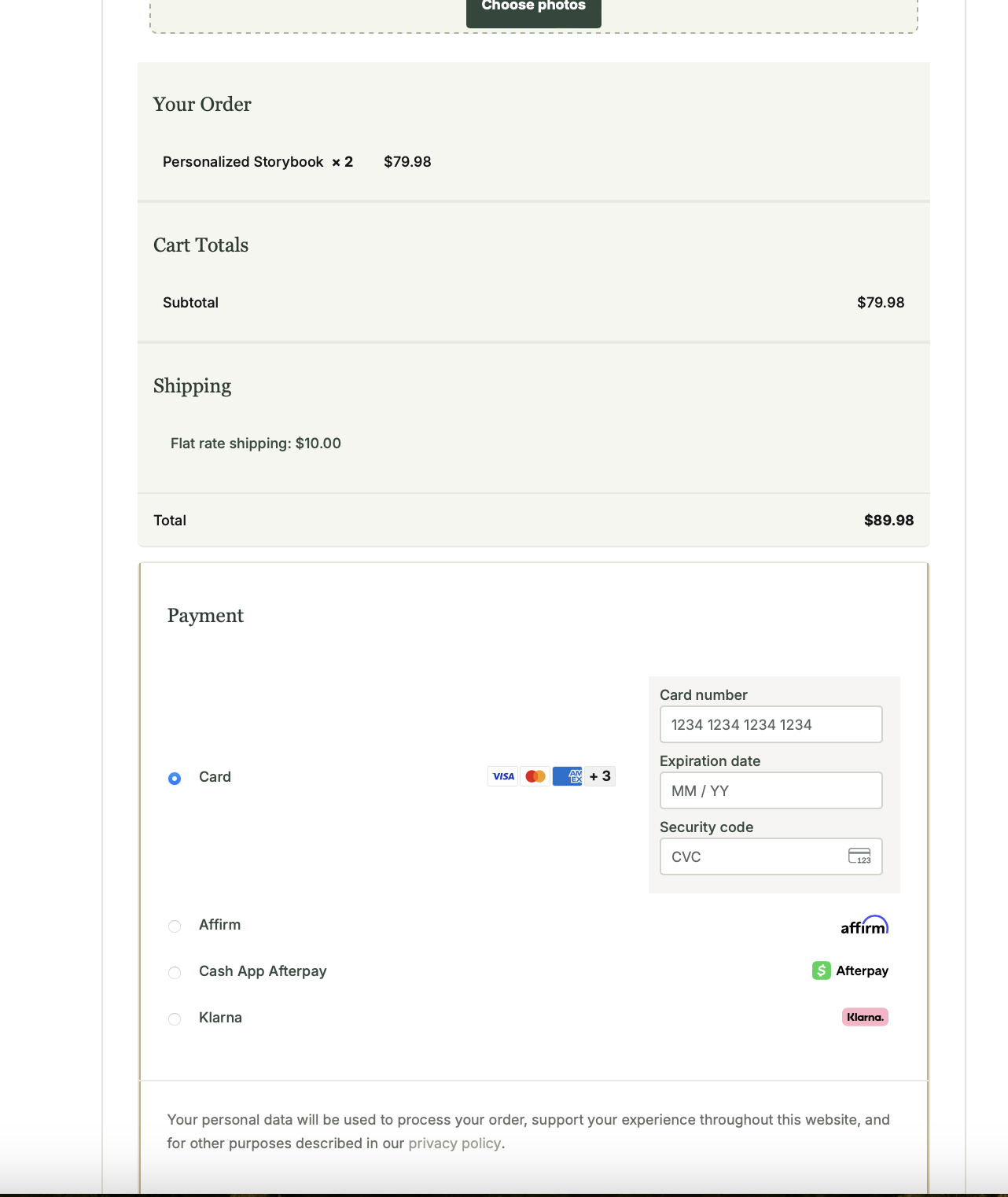
Before / Payment detail
The earlier payment detail separates the selected card option from its inputs and uses substantial vertical space for the order totals. Click to enlarge.
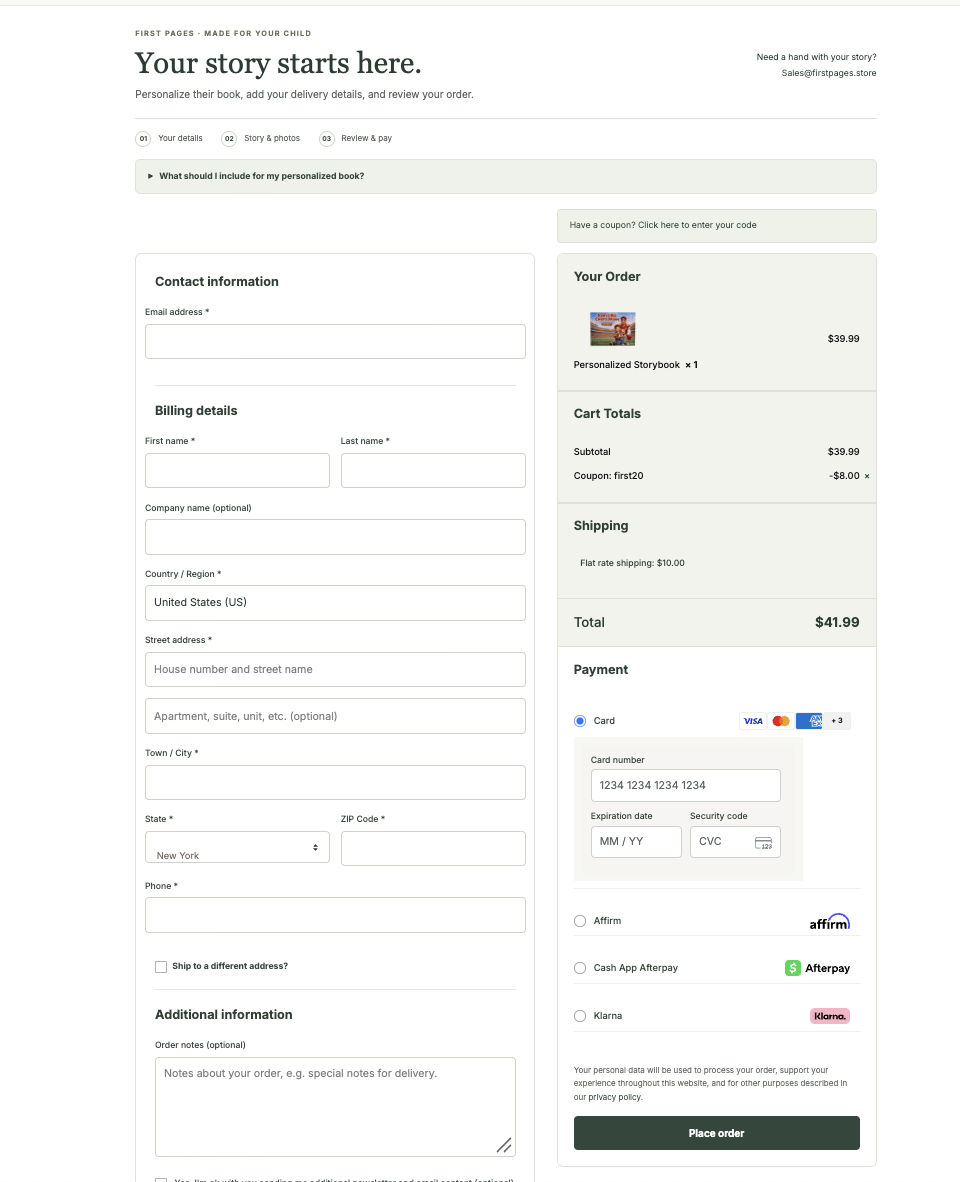
After / Revised desktop checkout
The revised desktop capture groups card inputs beneath the selected method and places the order summary beside customer details. The applied discount appears in the cost breakdown. Click to enlarge.
These captures show different portions of the checkout and different cart states: the earlier view contains two books; the later view contains one book with a coupon. Compare layout and grouping rather than the order totals. Screenshots document appearance, not completed payment testing.
Supporting review: personalization and mobile assistance
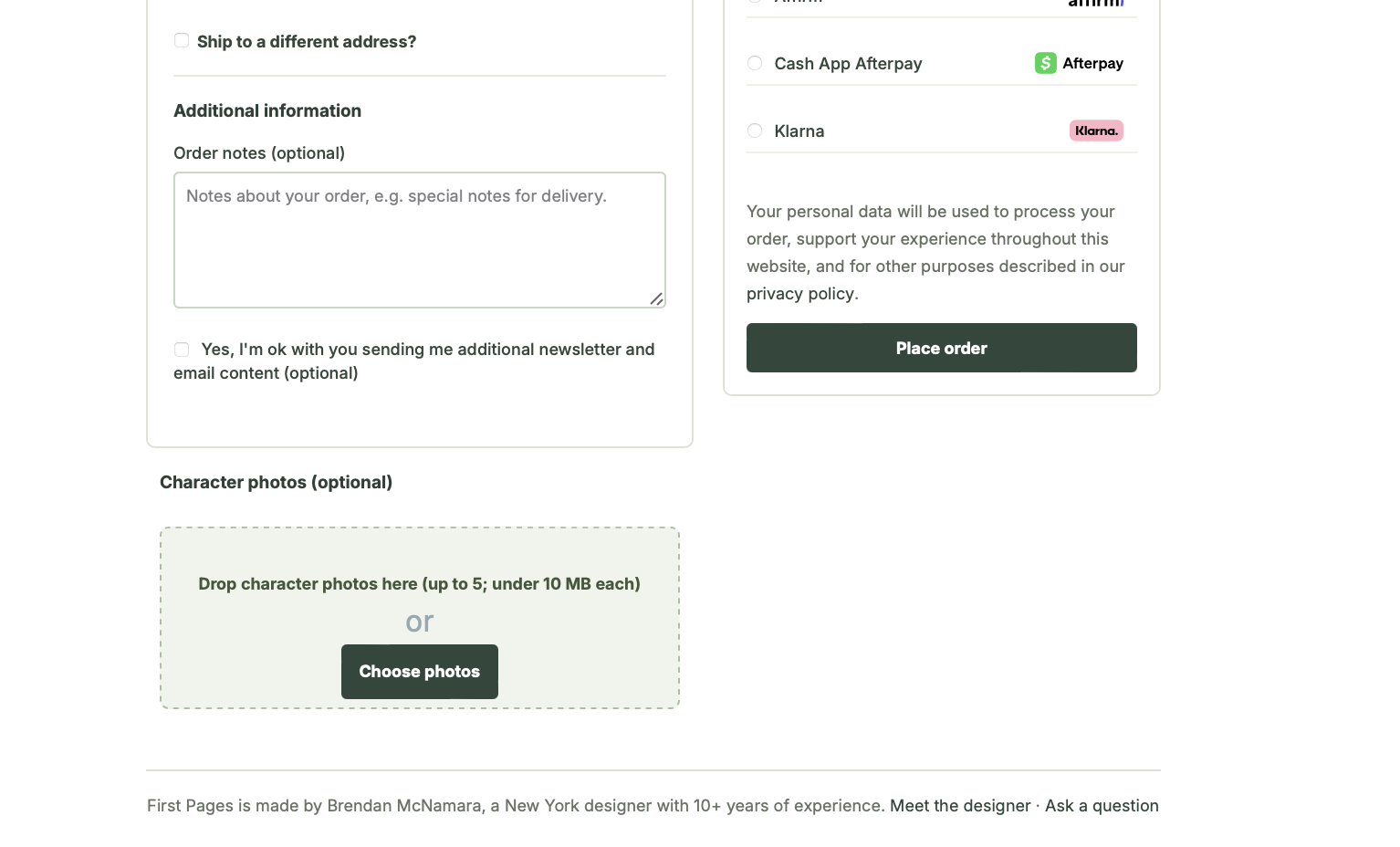
Personalization / Remaining refinement
The upload states its optional status, image count, and size limit. Generic delivery-note wording and the upload’s position relative to Place order remain refinement opportunities. Click to enlarge.
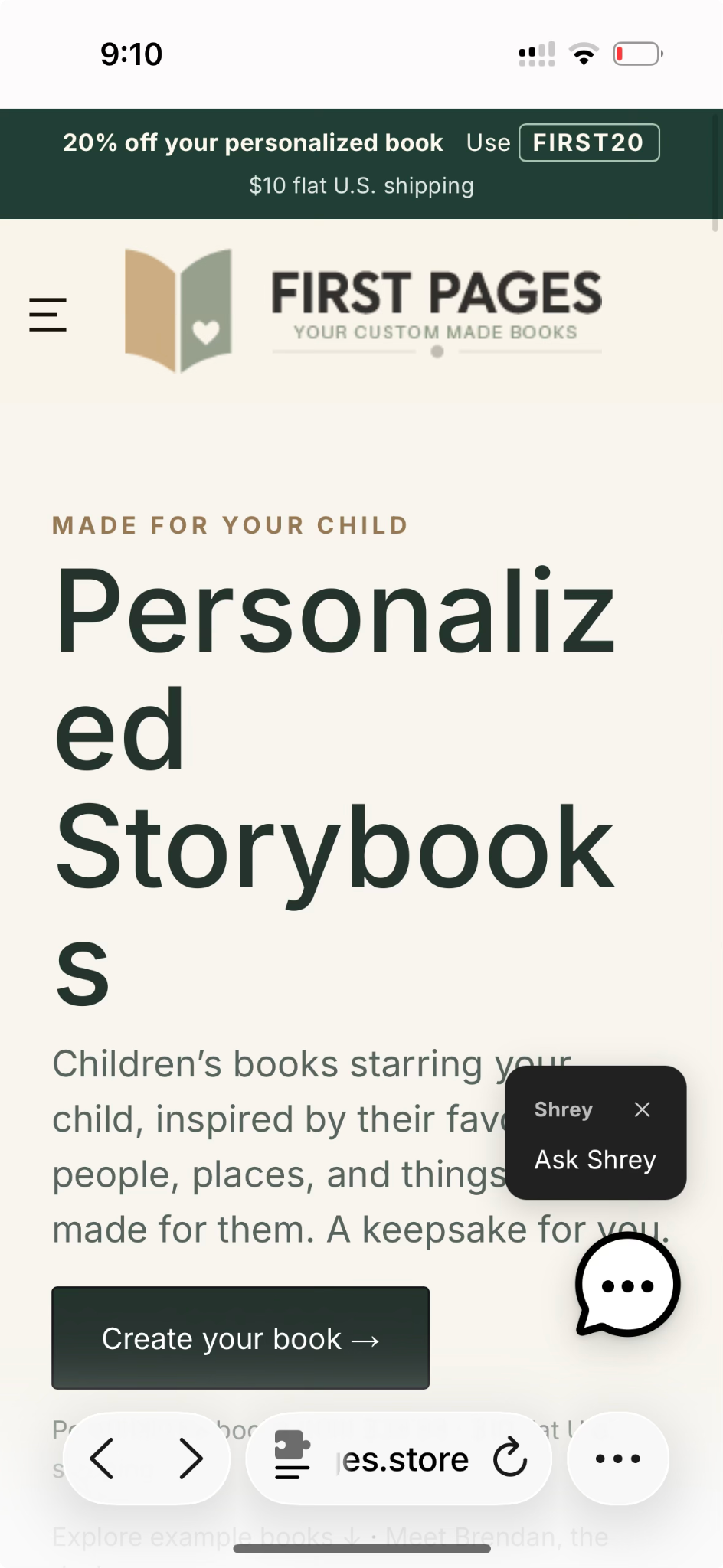
Earlier mobile capture / Issue identified
The earlier mobile capture documents mid-word headline wrapping and a concierge prompt overlapping the hero copy. The proposed response is responsive typography and a compact, dismissible assistance launcher; no corrected mobile capture is shown here. Click to enlarge.
01 / Proximity & grouping
Connect the choice to its fields.
Previously, the card inputs sat far to the right of the selected payment method. In the revised capture, the fields sit directly beneath it. This spatial grouping makes the relationship between the selected option and the required input clearer.
02 / Recognition over recall
Keep the order in view.
The revised desktop layout places the book thumbnail, quantity, shipping, and total in the same column as payment. Customers can refer to those details while reviewing the purchase. Sticky behavior and mobile positioning still require verification.
03 / Progressive disclosure
Make extra guidance available.
Personalization guidance appears in an expandable section, and coupon entry has a separate prompt. This creates a shorter initial view, but essential story instructions should also appear beside the story field.
What the review identified next
Sequence visibility: the earlier desktop capture showed wrapping step numbers. The later capture shows “01,” “02,” and “03” fitting within their markers, resolving the visible issue at that captured width. Smaller-screen behavior still needs testing.
Task-specific microcopy: the story input still reads “Order notes (optional)” with a delivery-note example. Rename it to match personalization and provide prompts for the child’s name, interests, and story idea; confirm which details are actually required.
Task order: the optional photo upload appears below the main details panel, while “Place order” is higher in the adjacent column. Test whether customers notice the upload before submitting.
Order feedback & control: the latest capture shows one book, an applied coupon with an $8.00 deduction, $10 shipping, and a $41.99 total. This makes the discount’s effect explicit. A quantity-edit route is still not visible in the captured summary; verify that customers can correct the order without losing story details.
Evidence: supplied desktop screenshots dated October 12, 2026. These are visual review findings, not measured usability outcomes. Validation should check whether customers can identify the total, correct quantity, find personalization inputs, and complete the flow without assistance.
05 / UX fundamentals
Make each decision easier to understand.
The checkout direction applies familiar UX principles to a purchase that requires personal input.
Hierarchy & progressive disclosure
Group story, photo, and order tasks into a clear sequence. Introduce detailed guidance where it becomes relevant, keeping the initial instruction short.
Recognition over recall
Use specific prompts and examples so customers can respond to a question rather than invent a creative brief from a blank field.
Feedback & error recovery
The proposed interface shows upload progress, explains problems beside the relevant field, and preserves entered details when a customer needs to make a correction.
Control & cost transparency
Keep the order editable and costs visible before the final commitment. Use action labels that describe the next step.
Accessible form structure
The implementation brief calls for persistent labels, explicit required and optional states, keyboard access, visible focus, and errors conveyed in text. These remain criteria for testing, not a claim of completed accessibility verification.
06 / AI-agent experience design
A book concierge with a defined role.
The live site introduces Shrey as the First Pages book concierge, inviting questions about personalized books, the process, and getting started. The design opportunity is to make that help contextual without distracting from the order.
Is the customer exploring a gift, asking about photos, or trying to place an order?
02 / CLARIFY
Ask one focused question only when it is needed. Avoid repeating information already supplied.
03 / GUIDE
Give a short answer grounded in store information, with a relevant link or next step.
04 / HAND BACK CONTROL
Return to the order form, or offer human help if the answer cannot be verified.
CUSTOMERDo I need to upload a photo?
SHREY · SAMPLE RESPONSEPhotos are optional. If you add them, use up to five JPG, PNG, or WebP images under 10 MB each, and identify who is pictured in your order notes.
CONTEXTUAL NEXT STEPContinue to story details →
Conversation-design example, not a recorded customer exchange. The concierge’s public greeting is live; the routing, contextual actions, and fallback behavior illustrated here are proposed and require implementation and testing.
Keep answers grounded.
Use approved product, upload, shipping, and order guidance. Do not invent delivery promises or claim an order change has been completed.
Keep personal input in the form.
Guide customers to the designated checkout and upload fields. The proposed agent should not ask for payment credentials or collect children’s photos in chat.
Make uncertainty useful.
When an answer is unavailable, acknowledge the limit and provide a support route. Customers should always be able to continue without using chat.
AI in the design workflow
AI-assisted exploration also supported structure, copy, and interface development. Human selection and review remain essential to the visual direction and the accuracy of customer-facing information.
ChatGPT: structure, copy iteration, interface ideas, and HTML/CSS assistance.
Gemini & Gamma: included in the project’s exploratory toolkit for developing and communicating ideas.
Human review: checking visual consistency, wording, hierarchy, and the suitability of generated content.
AI-assisted observations are design hypotheses; they do not replace customer interviews or usability testing. Live assistant responses and checkout completion have not been verified in this review.
07 / Outcome & next steps
A working foundation for a personal product.
The site brings product examples, process information, personalization guidance, and the order entry point into a connected experience. This project demonstrates how I combine visual storytelling, content design, and implementation to make a custom offer easier to understand.
The next validation step is to observe customers completing an order, review where they hesitate, and measure form completion and abandonment. Conversion improvements have not yet been measured.